
CAMEN is the heart of every R.A.M. system: set up recipes, inspect the running web in real time, classify defects and document every roll — on the laboratory bench just as in the inline system.
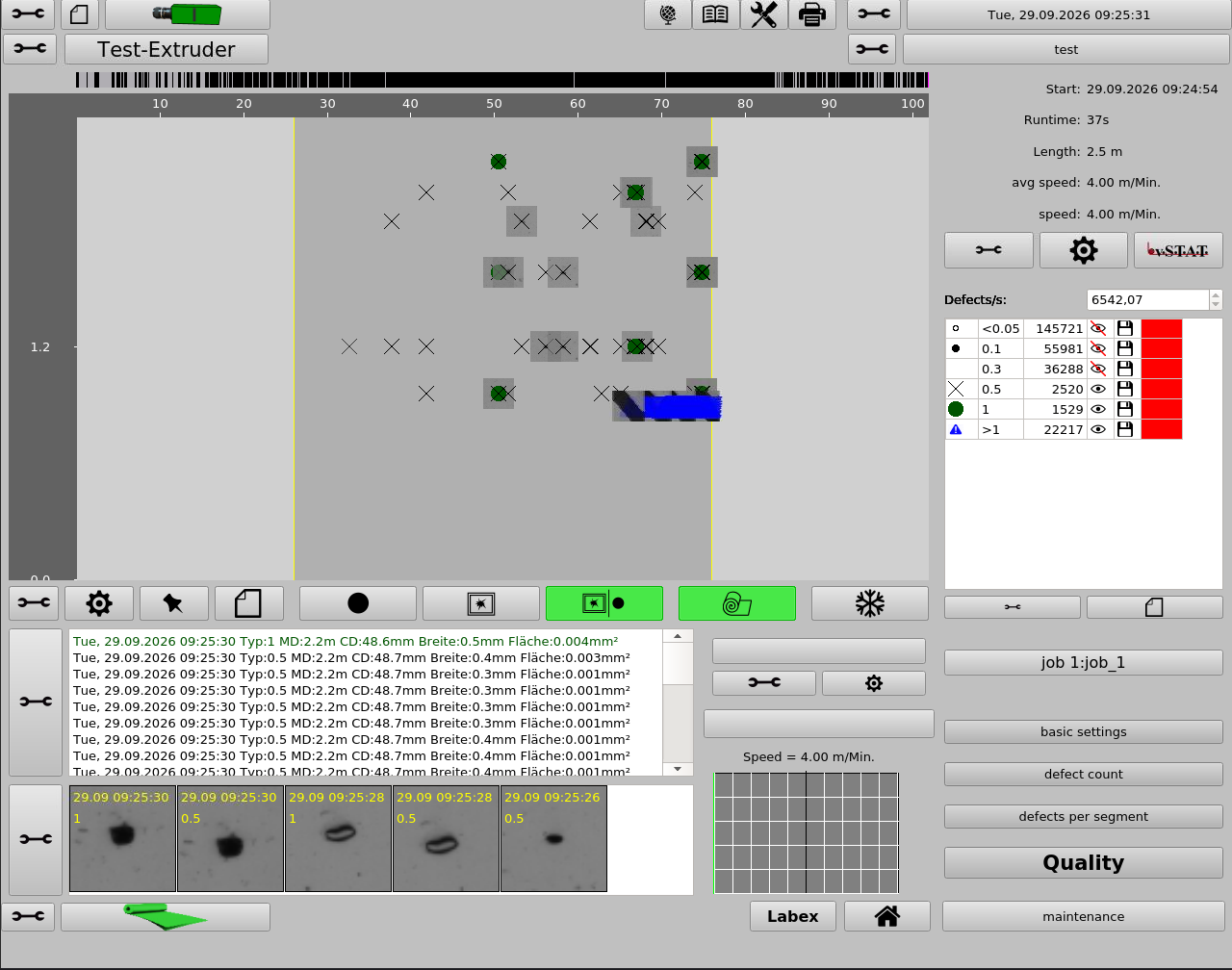
CAMEN combines live inspection at the machine with recipe management, defect classification and complete reporting. All settings for a product are stored in a recipe — so a product changeover takes seconds.
The workflow is the same on every system: set up the recipe, start automatic mode, classify defects, generate the roll report. Operators therefore feel at home on every machine — from the ITG 500 in the laboratory to the PQMex® on the recycling line.
Product changeover by recipe — all parameters are stored and instantly available.
Defects are detected and classified before entire rolls are affected.
Every roll is archived as a report with defect map, classes and defect images.
The same software on all R.A.M. systems — recipes, classification and reports work the same everywhere. That makes training and staff cover easier.
Store and load product-specific parameters such as grey level, thresholds and web width as a recipe.
Line-scan camera inspection of the running web — in bright field or dark field.
Classification by type, size and shape. Type classifiers can be taught in on recurring defect patterns.
Position of every defect across web width and roll length, optionally with a stored defect image.
Header and footer data, defect list, class overview, images and analogue data — archived per roll.
Customer, order number and shift are recorded with every roll and carried in the report.
Additional measurands such as thickness or opacity can be displayed as a trend across the roll.
Limits per defect class; alarm outputs report exceedances to the line control system.
Splitting the web into individual slits, plus tandem setups with several camera units.
Defect tables as CSV, reports as PDF, data export via the USB interface.
Role-based user levels protect recipes and base settings from unintended changes.
CAMEN speaks your operators' language — currently German, English and Polish.
CAMEN assigns every detected defect to a defect class in two steps – first by its type, then by size and shape. The classes determine what is counted, displayed, stored and assessed.
What counts is the brightness of the pixels: a defect that only exceeds the upper threshold is bright; one that only falls below the lower threshold is dark; if it contains both, it is combined. Stricter thresholds additionally separate the brightest and darkest parts. In the defect image, bright areas are coloured red and dark areas blue.
The defect is then checked against a size range – by width, area, equivalent diameter, largest dimension, separate bright or dark area, length-to-width ratio or form factor. The size ranges of consecutive classes never overlap.
Defined solely by size criteria – quick to set up and sufficient for many applications. Two standard templates with three types and three or four size classes deliver first results immediately; the size classes are calculated from the resolution of the system.
Taught in on recurring defect patterns and taking numerous defect properties into account at once. This allows defects to be distinguished far more finely than by size alone. Size and type classifiers can be combined freely; type classification is enabled by R.A.M. service.
Each class appears with its own symbol and colour in the defect map – in CAMEN and in vSTAT.
Per class for the whole roll or per segment, by count or area – right up to a signal to the PLC.
Save and load classifiers as templates – unlike recipes, also between different systems.
Four steps that are identical on every R.A.M. system.
Set grey level and thresholds, define the web width and save everything as a product recipe.
CAMEN continuously inspects the running web and records every defect with position and size.
Classify defects by type, size and shape – using size classifiers or, more finely, taught-in type classifiers.
Roll report with defect map, class overview and images — archived, exportable, printable.
CAMEN runs on every R.A.M. system — from the laboratory bench to the inline installation, with the same functionality everywhere. The inspection view is the same everywhere; the PQMex® and the ITG 500 – Bench Analyser have additional operator pages for their device functions.
Inline surface inspection of running webs — as Surface Camera, Economy, Biaxial and Tandem.
Laboratory systems for sample inspection: ITG 500 Bench Analyser, ITG 500 Gel Analyser and ITG 850 – LC.
Inline quality measurement system for recycling lines.
The roll reports recorded in CAMEN can be processed further in two variants.
Analysis of roll reports from the database: save, view and print — including statistics across many rolls.
The variant without a database: roll reports are analysed directly from the files.
Separate production-monitoring system — runs on Windows 10 or Debian 10.
Talk to us about your line — we will show you CAMEN on a running system.